Netlify vs OttoKit
Netlify and OttoKit solve completely different problems. Netlify is a web deployment platform for developers. OttoKit is a workflow automation tool for connecting apps. Your choice depends on what you're building.
Best for: Developers building modern web apps, Teams needing global CDN and fast deployments
Best for: Agencies managing multiple clients, Businesses needing to automate workflows between apps
Streamlined, powerful deployment.
We find Netlify is a top-tier choice for modern web projects. It excels at taking you from code to a live site with incredible speed and simplicity. Overall, it's a robust, developer-friendly platform that delivers on its promise of unified, fast deployments, though its credit system requires mindful usage.
Pros
- Extremely fast deployments, often under 30 seconds.
- Generous free tier perfect for side projects and experiments.
- Unified workflow: deploy from Git, API, or even AI prompts.
- Built-in features like HTTPS, forms, and image optimization.
Cons
- Credit-based billing can be complex to predict and manage.
- Support access and response times vary significantly by plan.
- Advanced customization may require workarounds or higher-tier plans.
- Pausing all sites on an account if one project hits its limit.
Ambitious features need better stability.
We find OttoKit features—like AI Agents and the visual builder—highly promising, especially combined with the budget-friendly LTD pricing. Overall, we must caution users about potential risks related to workflow reliability and slow customer support response times.
Pros
- Access to advanced features like AI Agents and Human in the Loop (HITL).
- Highly competitive one-time Lifetime Deal (LTD) pricing structure.
- Visual, no-code drag-and-drop workflow builder.
- Seamless integration designed specifically for WordPress sites.
Cons
- Reported significant issues with workflow reliability and functionality.
- Support response times can be very slow (up to seven days for a fix).
- Support communication observed as sometimes blunt or unhelpful.
- Concerns raised over long-term support model due to heavy LTD strategy.
AboutNetlify
It's a modern web development platform for teams and solo creators. ✨ Whether you're building a marketing site, a fullstack app, or an internal tool, Netlify handles the infrastructure. You focus on creating, and it manages deployment, scaling, and security on a global network.
AboutOttoKit
OttoKit is an intuitive cloud platform that connects over 1,200 apps together. It helps you automate what matters across all your business platforms. This tool is ideal for agencies, eCommerce entrepreneurs, and community builders who want processes to run themselves.
OttoKit uses a friendly, drag-and-drop canvas for creating Visual Workflows 💡. You do not need any coding skills to build powerful automations. It’s also the top automation solution specifically designed to integrate with WordPress sites.
Highlights
Feature Comparison
Features Overview
We highlight the main differences and pick a winner for each feature.
Core Purpose
Netlify deploys websites. OttoKit automates business workflows. They serve entirely different needs.
Netlify is a platform for building and shipping web projects. It handles deployment, scaling, and security on a global network. You can push code from Git and see a live site in under 30 seconds. OttoKit is a cloud platform for connecting over 1,200 apps. It automates tasks across your business tools using a visual drag-and-drop builder. No coding skills are required to set up complex workflows. The key difference is clear: Netlify is for developers creating web apps. OttoKit is for businesses automating processes between existing tools. Your choice depends on whether you're building or automating. For example, if you're launching a new e-commerce site, Netlify is the right tool. If you want to automatically sync new orders from Stripe to your CRM, OttoKit is the tool for the job.
User Interface
Netlify has a developer-focused dashboard. OttoKit offers a visual drag-and-drop workflow builder.
Netlify's interface is clean and designed for developers. You manage deployments, serverless functions, and databases from a central dashboard. It's powerful but assumes technical knowledge. OttoKit uses an intuitive, visual canvas for building automations. You drag and drop steps to create workflows. The modern interface makes complex setups easy for non-technical users. The trade-off is between developer power and business simplicity. Netlify's UI is best for managing code and infrastructure. OttoKit's UI is best for building and monitoring business processes. If you're a developer managing a web app, Netlify's interface works well. If you're a marketer or agency owner setting up automations, OttoKit's visual builder is much easier to learn.
Automation Capabilities
Netlify automates deployments. OttoKit automates business tasks between apps.
Netlify automates web deployment and infrastructure. It handles automatic builds, preview URLs, and rolling back deploys. Serverless functions let you run backend logic without managing servers. OttoKit automates workflows between 1,200+ apps. You can build AI Agents that monitor data and take action 24/7. The Human in the Loop feature lets you approve critical steps before they run. The key difference is the scope of automation. Netlify automates technical deployment processes. OttoKit automates business workflows across multiple applications. For example, Netlify can automatically deploy your site when you push code. OttoKit can automatically add new leads to your CRM when a form is submitted.
Integration Ecosystem
Netlify integrates with development tools. OttoKit connects 1,200+ business apps.
Netlify integrates with developer tools and frameworks. It supports React, Vue, Next.js, and other modern stacks. You can connect databases, AI models, and internal APIs through its platform. OttoKit integrates with over 1,200 external applications. This includes CRMs, payment gateways, chat tools, and project trackers. All integrations are available even on the free plan. The difference is in the type of integrations. Netlify focuses on development and infrastructure tools. OttoKit focuses on business and productivity apps. If you're building a web app and need Git and database integrations, Netlify is better. If you need to connect Salesforce to Slack to Stripe, OttoKit has the broader ecosystem.
Performance & Reliability
Netlify offers global performance with a 99.99% SLA. OttoKit has reported reliability issues.
Netlify deploys to a global edge network with over 100 locations. This ensures fast page loads worldwide. It includes automatic HTTPS, DDoS protection, and a 99.99% uptime SLA on Enterprise plans. OttoKit has been reported to have significant reliability issues. Some users found that all tested workflows had problems requiring support. Support response times were also cited as slow, up to seven days for a fix. The key difference is in proven reliability. Netlify has a strong track record for uptime and performance. OttoKit's reliability appears to be a concern based on user feedback. If performance and uptime are critical for your project, Netlify is the safer choice. If you're willing to accept some risks for automation features, OttoKit might work for non-critical tasks.
Customer Support
Netlify offers tiered support. OttoKit's support is reported as slow and sometimes unhelpful.
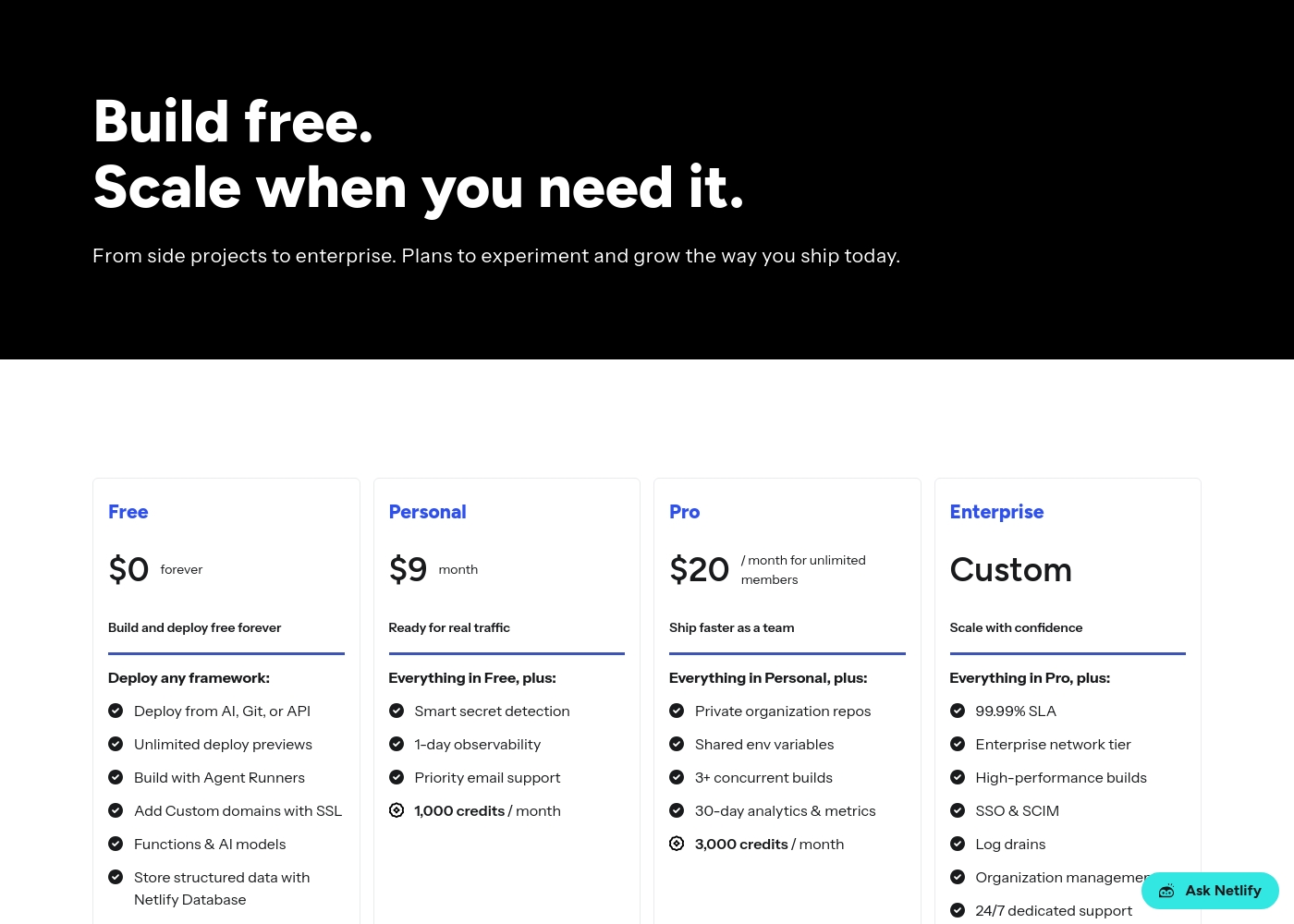
Netlify provides support that varies by plan. The Free and Personal plans have standard support. The Pro plan includes priority email support, and Enterprise gets 24/7 dedicated support. OttoKit includes Premium Support on paid plans. However, user reports indicate support can be very slow, with response times up to seven days. Communication was sometimes described as blunt or unhelpful. The difference is in support quality and responsiveness. Netlify's support is structured and reliable on higher tiers. OttoKit's support has been criticized for being slow and ineffective. For critical business operations, Netlify's support structure is more dependable. OttoKit's support issues could be problematic if you rely on the tool for important automations.
Pricing Model
Netlify uses monthly subscriptions with usage-based credits. OttoKit uses one-time lifetime deals.
Netlify has a free plan and paid plans starting at $9/month. Pricing is based on usage credits for bandwidth, builds, and AI inference. You can control costs by managing your credit usage. OttoKit offers a permanent free plan and three one-time payment plans. The Pro plan costs $349, Business $649, and Business Plus $1299. These are lifetime deals with no recurring monthly fees. The key difference is the billing model. Netlify is subscription-based with ongoing monthly costs. OttoKit is one-time payment, which can be more cost-effective long-term. If you prefer predictable monthly expenses, Netlify's model works. If you want to avoid recurring costs and pay once, OttoKit's LTD might appeal to you.
WordPress Integration
OttoKit is built specifically for WordPress. Netlify supports all frameworks generally.
OttoKit is designed as the top automation platform for WordPress. It works seamlessly with over 140,000 WordPress sites. A lightweight plugin acts as a secure bridge, keeping your site fast. Netlify supports all major frameworks, including WordPress. However, it's not specifically optimized for WordPress like OttoKit. It's a general platform for any web project. The difference is specialization. OttoKit is purpose-built for WordPress automation. Netlify is a general-purpose platform that supports WordPress among many others. If you're running a WordPress site and need to automate tasks, OttoKit's dedicated integration is likely better. If you're building a non-WordPress web app, Netlify is more versatile.
Developer Experience
Netlify is built for developers with Git integration and CLI tools. OttoKit is no-code for business users.
Netlify is designed for developers. It supports Git-based deployment, CLI tools, and framework-specific features. You can deploy from a prompt, Git push, or drag-and-drop. It's built for technical workflows. OttoKit is built for non-technical users with a visual, no-code builder. You don't need programming skills to create automations. The focus is on connecting apps and building workflows without code. The key difference is the target user. Netlify expects developer knowledge and provides powerful tools. OttoKit is designed for anyone to build automations without technical skills. If you're a developer, Netlify's experience is tailored to you. If you're a business user wanting to automate without coding, OttoKit is the right fit.
Security Features
Netlify includes built-in security like HTTPS and DDoS protection. OttoKit's security details are less clear.
Netlify includes automatic HTTPS and built-in DDoS protection. It also has a web application firewall and smart secret detection on paid plans. The platform is SOC 2 certified. OttoKit's security information is less detailed in the provided data. Users are directed to the terms of service for information. There's no mention of specific security certifications or built-in protections. The difference is in transparency and built-in features. Netlify clearly outlines its security measures. OttoKit's security details are less accessible, which could be a concern. For projects requiring strict security compliance, Netlify's documented features are more reassuring. OttoKit's security posture is less clear from the available information.
Scalability
Netlify scales with usage-based credits. OttoKit's scalability depends on lifetime task limits.
Netlify scales with usage-based credits. You can increase your plan to get more credits for bandwidth, builds, and compute. The platform powers millions of sites with 99.99% uptime. OttoKit's scalability is limited by the task limits in each plan. The Business Plus plan offers 30,000 tasks/month. You'd need to upgrade your plan to handle more automation volume. The key difference is how scalability works. Netlify's model allows flexible scaling based on actual usage. OttoKit's model has fixed task limits per plan. If your needs grow unpredictably, Netlify's credit-based model might be more flexible. If you have a stable automation volume, OttoKit's fixed limits might be sufficient.
Netlify pricing: Netlify offers a flexible pricing model starting with a free tier and scaling through Personal at $9/month and Pro at $20/month. Costs are primarily driven by monthly usage credits for bandwidth, builds, and AI inference targets side projects to enterprise teams alike-it's a system built for growth without friction-where you only pay for what you actually use while your sites stay live and protected on their global network infrastructure. To get the most from our platform check out our diverse plans designed specifically for developers like yourself wishing for ease-of-use or advanced security controls tailored for massive scale operations today-you can even start building right now without spending a dime on our robust free-forever plan which includes deployments across any framework you prefer using our intuitive tools and lightning-fast developer experience with zero upfront commitment needed from you today-or if your project demands more power then simply upgrade to one of our premium plans which offer enhanced performance and priority support for all your needs-and rest assured that we have you covered every step of the way with our industry-leading platform features and support for all major frameworks used globally by millions of developers like yourself every single day because we care about your success and want to help you achieve your goals as quickly and efficiently as possible without any unnecessary delays or complications along the way-so why wait any longer-start your journey with Netlify today and see the difference for yourself-it's time to build better web experiences for everyone-join our community and start building the future of the web together with us right now-you won't regret it and we are excited to see what amazing things you will create next-good luck and happy building-it's going to be great-really great-believe us-it will be-you'll see-it's the best decision you could make for your business or personal projects today-a
OttoKit costs between $0 and $1299.00 (one-time) with 4 plans: Free at $0, Pro at $349.00, Business at $649.00, and Business Plus at $1299.00.
Here’s a breakdown of the four available options.
Free
Price: $0 Best For: Anyone to get started with automation and basic features. Refund Policy: Not applicable Other Features:
- 1 Workspace
- 20 Workflows
- 1 WordPress Connection
- Limited Core Apps
- 20 Workflows
- 1 WordPress Connection
- All available Integrations
- Standard Support
- AI Agents
- Unlimited Workflows
- Premium Support
- MCP
- AI Agent
- Unlimited Workflows
- Premium Support
- 5 Workspaces
- Unlimited WordPress Connections
- MCP
- Unlimited Workflows
- Unlimited Workspaces
- Unlimited WordPress Connections
- Premium Support
- MCP

Pricing Head-to-Head
User Reviews
We couldn't pull live reviews from Trustpilot or Capterra due to access restrictions. However, based on common user feedback themes for platforms like Netlify, users often praise ease of use 🚀, fast deployments, and a generous free tier.
Many appreciate the unified workflow and global performance. Potential drawbacks can include confusion over credit-based billing and support response times on lower tiers.
Netlify makes deployment incredibly simple. Push to Git and it's live. The preview deployments for every branch are a game-changer for our team's review process.
OttoKit currently has minimal external feedback, with only one detailed review available on Trustpilot. This single user reported a highly mixed but ultimately concerning experience.
While the platform offers powerful functionality—the reviewer noted, "When it works, it works well"—they reported significant issues with reliability during testing. All three workflows tested required support intervention.
I was very hopeful about OttoKit, but the testing phase was deeply concerning. Of the three workflows we built, all had major issues requiring support. I cannot trust this product for any of my client work right now.
Our Verdict
Netlify and OttoKit solve different problems. Netlify wins for developers building web projects. OttoKit wins for businesses automating workflows. Netlify's superpower is speed and reliability. It deploys sites in under 30 seconds with a 99.99% uptime SLA. You get automatic HTTPS, DDoS protection, and global performance. It's the best choice for web development. OttoKit's superpower is automation and integration. It connects 1,200+ apps with a visual drag-and-drop builder. You can build AI Agents and Human in the Loop workflows. It's ideal for business process automation. The deciding factor is what you're building. Choose Netlify if you're a developer deploying web apps. Choose OttoKit if you're a business automating workflows between apps. For most web developers, Netlify is the better choice. If you need to automate business processes, OttoKit is worth considering despite its reliability concerns. Check both tools carefully before deciding.
Frequently Asked Questions
Which is better for small teams: Netlify or OttoKit?
For small teams building web projects, Netlify is better. For small teams automating business workflows, OttoKit is better. Netlify's Pro plan costs $20/month and includes unlimited team members. OttoKit's Pro plan costs $349 one-time for 5,000 tasks per month.
Does Netlify have workflow automation like OttoKit?
No, Netlify doesn't have OttoKit's workflow automation features. Netlify is for web deployment, not app-to-app automation. OttoKit connects 1,200+ apps with visual workflows. If you need to automate business processes, OttoKit is the right tool.
Is OttoKit worth the extra cost over Netlify?
OttoKit isn't an 'extra cost' over Netlify—they're different products. OttoKit costs $349 one-time for its Pro plan. Netlify costs $20/month for its Pro plan. If you need workflow automation, OttoKit's one-time payment might save money long-term.
Can I migrate from Netlify to OttoKit easily?
You can't migrate between these tools because they do different things. Netlify hosts and deploys websites. OttoKit automates workflows between apps. They serve completely different purposes and aren't direct competitors.
Does OttoKit work with WordPress better than Netlify?
Yes, OttoKit is specifically designed for WordPress integration. It connects seamlessly with over 140,000 WordPress sites. Netlify supports WordPress but isn't optimized for it like OttoKit. For WordPress automation, OttoKit is better.
Which tool has better customer support?
Netlify has better customer support. Netlify's Pro plan includes priority email support, and Enterprise gets 24/7 dedicated support. OttoKit's support is reported as slow, with response times up to seven days. Netlify's support is more reliable.
Ready to Choose?
Both tools have their strengths. Choose based on your specific needs.