VEA vs Zoho Books
People argue about VEA vs Zoho Books—they both try to simplify business ops. VEA uses a unified, AI-powered dashboard. Zoho Books emphasizes breadth: invoicing, inventory, and reports.
Best for: Solopreneurs seeking an all-in-one dashboard with AI insights, Small teams (2-5) wanting fast setup and predictable per-seat pricing
Best for: Growing e-commerce/retail teams needing inventory and multi-currency, Teams 5-20 needing automation, advanced reporting, and bank feeds
AI-powered operations with solid basics.
We found VEA AI to be a promising platform for automating back-office tasks, especially for service businesses. Overall, it offers a clear value proposition with tiered pricing, but the external user feedback we could gather is limited to a telehealth service, not the core AI software.
Pros
- Clear tiered pricing structure with defined features per plan
- Promises to automate routine tasks and save 20+ hours per week
- Provides real-time financial clarity and operational dashboards
- All-in-one platform aiming to replace multiple software tools
Cons
- External reviews do not correspond to the AI business platform
- No verified user feedback on the core AI software's performance or reliability
- Limited information on integrations or onboarding process from external sources
- Pricing starts at $24.95 per user, which may be high for small teams
Scalable Accounting with Clear Value.
We find that Zoho Books provides a comprehensive and budget-friendly alternative to complex accounting systems. The scalability, permanent free tier, and full financial management capabilities are major strengths. Overall, this is a top recommendation for growing businesses needing feature-rich accounting without high legacy costs.
Pros
- Permanent Free plan available for micro-businesses.
- Highly scalable pricing structure with competitive annual rates.
- Cloud-based, comprehensive solution covering invoicing, inventory, and expenses.
- User-friendly interface simplifies daily financial tasks.
Cons
- Severe MFA reset issues reported across the Zoho suite can lock users out of accounts.
- Mixed reports regarding customer service responsiveness.
- All plans impose explicit annual limits on invoices and expenses.
- External accounting-specific feedback on accuracy and reliability is limited.
AboutVEA
VEA AI is an all-in-one business management platform. It's designed for service business owners who want to stop micromanaging. The platform uses AI agents to automate tasks like project tracking, client management, and accounting. It aims to replace a stack of separate tools with a single, intelligent system. 💡
AboutZoho Books
Zoho Books is comprehensive, cloud-based accounting software built specifically for growing businesses. It helps you manage your entire financial workflow seamlessly, integrating key functions into one place. You can handle everything from tracking expenses to controlling inventory and processing invoices. Because it’s available through mobile apps for iOS and Android, you can easily manage your books on the go. ✅
Highlights
Feature Comparison
Features Overview
We highlight the main differences and pick a winner for each feature.
User Interface
VEA uses a single, unified dashboard. Zoho Books offers modular, feature-rich pages.
VEA presents everything on one, unified dashboard. It centers core ops like customers, invoicing, and scheduling. Zoho Books offers modular, feature-rich pages for finances. You can manage invoices, inventory, bank feeds, and reports. Key difference: VEA bets on simplicity; Zoho Books bets on breadth. Real-world impact: small teams move fast with VEA; larger teams benefit from Zoho Books' breadth.
Automation
VEA leans on AI-driven suggestions; Zoho Books emphasizes end-to-end automation.
VEA automates with AI-powered insights. Automations focus on recommended actions within the dashboard. Zoho Books automates payments, reminders, and recurring invoices. It also automates workflows across vendors, projects, and reports. Key difference: VEA targets decision support; Zoho Books targets process automation. Real-world impact: lean teams move faster with VEA; bigger teams automate end-to-end with Zoho.
Invoicing & Payments
VEA handles invoices; Zoho Books covers quotes, payments, and online links.
VEA handles invoices within its unified dashboard. Zoho Books handles professional invoices, quotes, payments, and online links. Zoho offers more invoicing features like reminders and recurring invoices. If you need optimized receivables, Zoho Books wins here. Real-world impact: Zoho reduces follow-ups; VEA keeps things tight and simple.
Inventory & Orders
VEA doesn’t natively track inventory; Zoho Books provides end-to-end stock control.
VEA focuses on core ops like customers and scheduling, with no inventory feature highlighted. Zoho Books offers full inventory control and order tracking. Key difference: Zoho Books supports stock levels and reorder alerts; VEA does not. Real-world impact: retail teams should pick Zoho for stock accuracy.
Multi-currency
VEA doesn’t offer multi-currency; Zoho Books supports it in real time.
VEA pricing is per user, with no explicit multi-currency feature described. Zoho Books includes multi-currency and real-time exchange rates. This matters for global sales and international vendors. Real-world impact: Zoho helps international teams avoid manual conversions.
Banking & Reconciliation
VEA focuses on a unified dashboard; Zoho Books supports bank feeds and reconciliation.
VEA’s data is centralized in one view, but no bank feed claim is made. Zoho Books connects bank feeds and reconciles accounts. Key difference: Zoho provides bank-facing automation; VEA stays internal. Real-world impact: Zoho reduces reconciliation headaches.
Free Plan & Trials
VEA pricing is per user; Zoho Books offers a Free plan and a 14-day trial.
VEA pricing is $24.95 per user per month, with no annual option noted. Zoho Books has a permanent Free plan and a 14-day trial. Trade-off: Zoho gives zero-cost entry; VEA is per-seat, grows with your team. Real-world impact: startups can test Zoho for free; VEA is predictable as you scale.
Migration & Onboarding
VEA onboarding is not detailed; Zoho Books promotes migration support.
VEA’s onboarding details aren’t explicit in the data. Zoho Books actively promotes easy migration from other systems. This reduces data-transfer friction and setup time. Real-world impact: Zoho helps teams switch with less downtime.
Reporting & Analytics
VEA uses AI analytics; Zoho Books provides 50+ reports and advanced options.
VEA’s AI analytics surface insights across core areas. Zoho Books offers 50+ pre-built reports and divisional reporting. Trade-off: VEA focuses on guided decisions; Zoho emphasizes comprehensive reporting. Real-world impact: Zoho helps data-driven decisions at scale.
VEA costs between $24.95 and $59.95 per user, per month on an annual plan with 3 plans available: Business Class at $24.95, First Class at $39.95, and Private Jet at $59.95.
Take a look below to compare the features included with each options:
Business Class
Price: $24.95 per user, per month (billed annually) Best For: Team alignment and task tracking Other Features: Task tracking, team alignment, smoother operations
- Stop the chaos
- Get your team aligned
- Tasks tracked
- Operations running smoothly without constant check-ins
- AI agents handle grunt work
- Eliminate $15/hour tasks
- Help team move faster
- Focus on what matters
- AI experts analyze your business
- Flag problems before they cost money
- Guide major decisions with trusted data
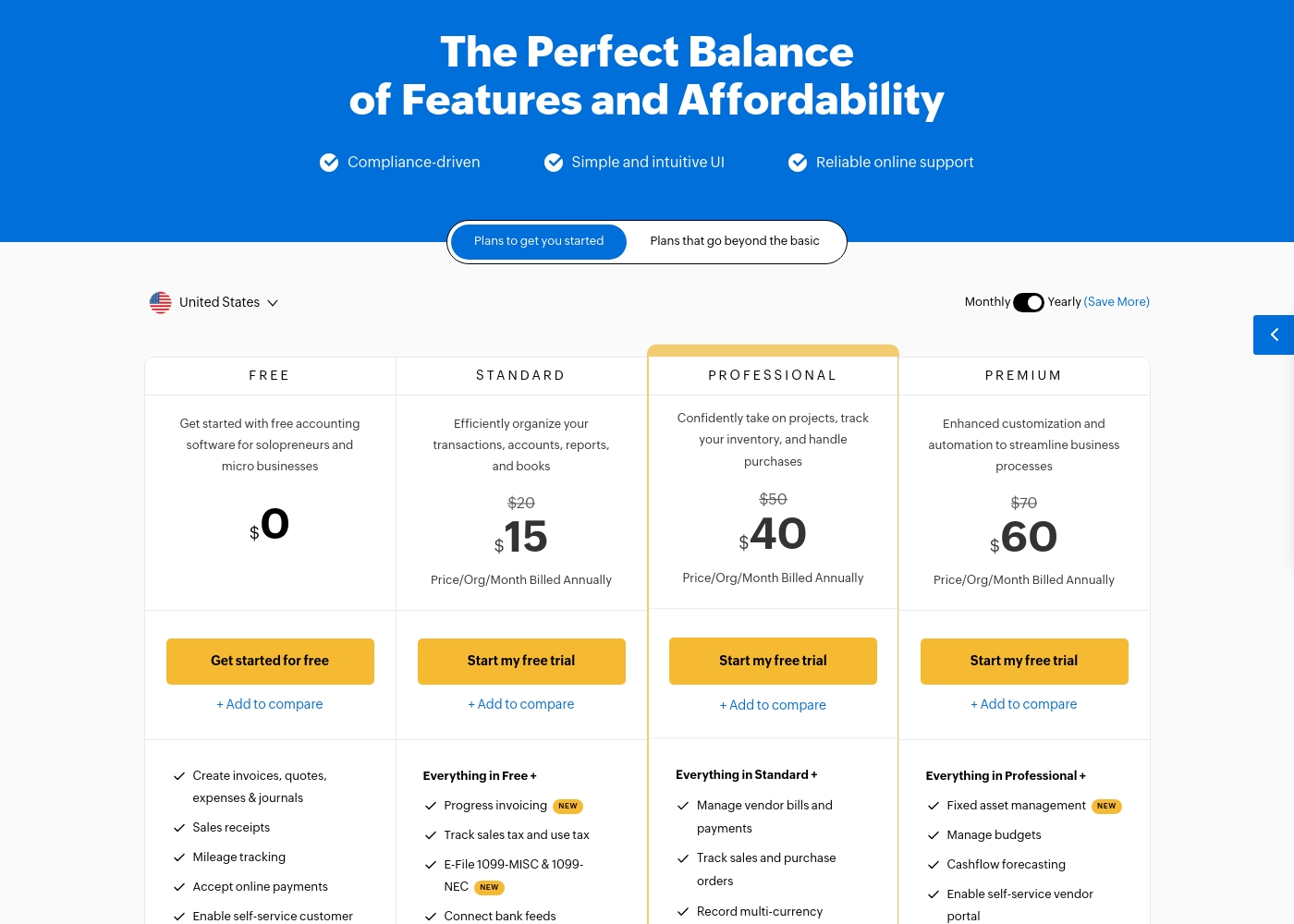
Zoho Books costs between $0 and $240 per month (billed annually) with six plans: FREE at $0, STANDARD at $15, PROFESSIONAL at $40, PREMIUM at $60, ELITE at $120, and ULTIMATE at $240.
Zoho Books offers plans built to grow with your company, from sole proprietors to large teams. Let's look closely at what is included in each option.
FREE
Price: $0.00 Best For: Solopreneurs and micro businesses (up to $50K annual revenue) Other Features:
- Create invoices, quotes, expenses, and journals
- Process sales receipts and track mileage
- Enable self-service customer portal
- Email Support (1 User + 1 Accountant)
- Create invoices, quotes, expenses & journals
- Sales receipts
- Mileage tracking
- Accept online payments
- Enable self-service customer portal
- Progress invoicing
- Track sales tax and use tax
- E-File 1099-MISC & 1099-NEC
- Connect bank feeds
- Generate divisional reports with reporting tags
- Manage vendor bills and payments
- Track sales and purchase orders
- Record multi-currency transactions
- Bill timesheets
- Project profitability
- Fixed asset management
- Manage budgets
- Cashflow forecasting
- Enable self-service vendor portal
- Set up custom domain
Pricing Notes
- VEA charges $24.95 per user per month with no annual option stated.
- Zoho Books offers a permanent Free plan and a 14-day free trial.
- Zoho Books plans insert annual limits on invoices/expenses per plan.
- Zoho Books supports migrations to ease switching from other systems.
- Zoho Books pricing can be more budget-friendly for micro-businesses.
- VEA pricing is per-seat; Zoho Books scales via tiered plans and add-ons.
Pricing Head-to-Head
User Reviews
On Trustpilot, VEA (Health) holds a 4.1/5 rating with five reviews in the last 12 months, all positive. Users consistently praise the straightforward ordering process, quick shipping (often 3-4 days), and secure packaging.
📦 Several highlight clear communication and responsive support for questions. One reviewer noted feeling tangible benefits like better energy.
The thing I appreciated most was how normal and straightforward everything felt. No weird process, no pressure, just clear communication and quick shipping. Made the whole experience really comfortable.
While Zoho maintains an overall positive rating of 4.1/5 across thousands of reviews, most specific feedback provided recently centers on the Zoho Social tool, not the Books accounting software. Regardless, the consensus affirms Zoho’s commitment to excellent ease of use and high functional value.
Users consistently praise the platform for its intuitive interface, which streamlines workflows and simplifies multi-account management. Many appreciate that Zoho provides advanced functionality for a fraction of the cost of competitors, representing significant value for startups and small teams.
This platform offers huge functionality without the huge price tag. I used managers that cost ten times more, but Zoho offers the same key features and is incredibly user-friendly. It’s excellent value.
Our Verdict
Bottom line: Zoho Books tends to win for most teams, but VEA shines for lean setups. If you need inventory, multi-currency, and deep reporting, Zoho Books delivers. If you want a super-simple, AI-assisted dashboard with per-seat pricing, VEA is compelling. Your decision hinges on scale and scope: Zoho for breadth, VEA for speed.
Frequently Asked Questions
Which is better for small teams: VEA or Zoho Books?
Zoho Books offers a Free plan and scalable tiers, which helps small teams start free and grow. VEA is per-user, with a straightforward $24.95 per user monthly. For tight budgets, Zoho Books wins; for lean ops, VEA wins.
Does VEA have inventory management like Zoho Books?
VEA focuses on a unified dashboard for customers, invoicing, work orders, and scheduling. It doesn’t list inventory management. Zoho Books provides full inventory tracking and related features.
Is Zoho Books worth the extra cost over VEA?
Zoho Books offers a Free plan and multiple tiers, plus migration help. VEA is $24.95 per user, with no annual option stated. If you need inventory and deep reports, Zoho Books is worth it.
Can I migrate from VEA to Zoho Books easily?
Zoho Books advertises migration support to help move data from other systems. This reduces switch friction. VEA does not publish explicit migration assistance in the data provided.
Does Zoho Books have a free trial?
Yes. Zoho Books offers a 14-day free trial and a permanent Free plan for micro-businesses.
Can I run multiple businesses in Zoho Books?
Yes. Zoho Books supports multiple organizations under one account, making multi-entity management easy.
Ready to Choose?
Both tools have their strengths. Choose based on your specific needs.